
用 mq9 连接两个 LangGraph Agent
问题
LangGraph 很好地解决了单个 Agent 内部的逻辑编排——工具调用、状态管理、条件分支都在图里处理,清晰可控。
但多个 Agent 之间怎么协作?
常见的做法是放在同一个进程里,用 Supervisor 模式调度。这在简单场景下够用,但有一个根本局限:所有 Agent 必须在同一个进程里,无法跨服务部署。
生产环境里,ResearchAgent 和 ReportAgent 往往是独立的服务,可能运行在不同的机器上,有各自的资源配置和扩缩容策略。这时候 Supervisor 模式就不够用了。
mq9 解决的就是这个问题——让两个独立进程的 LangGraph Agent 通过 Mailbox 异步通信,完全解耦。
架构
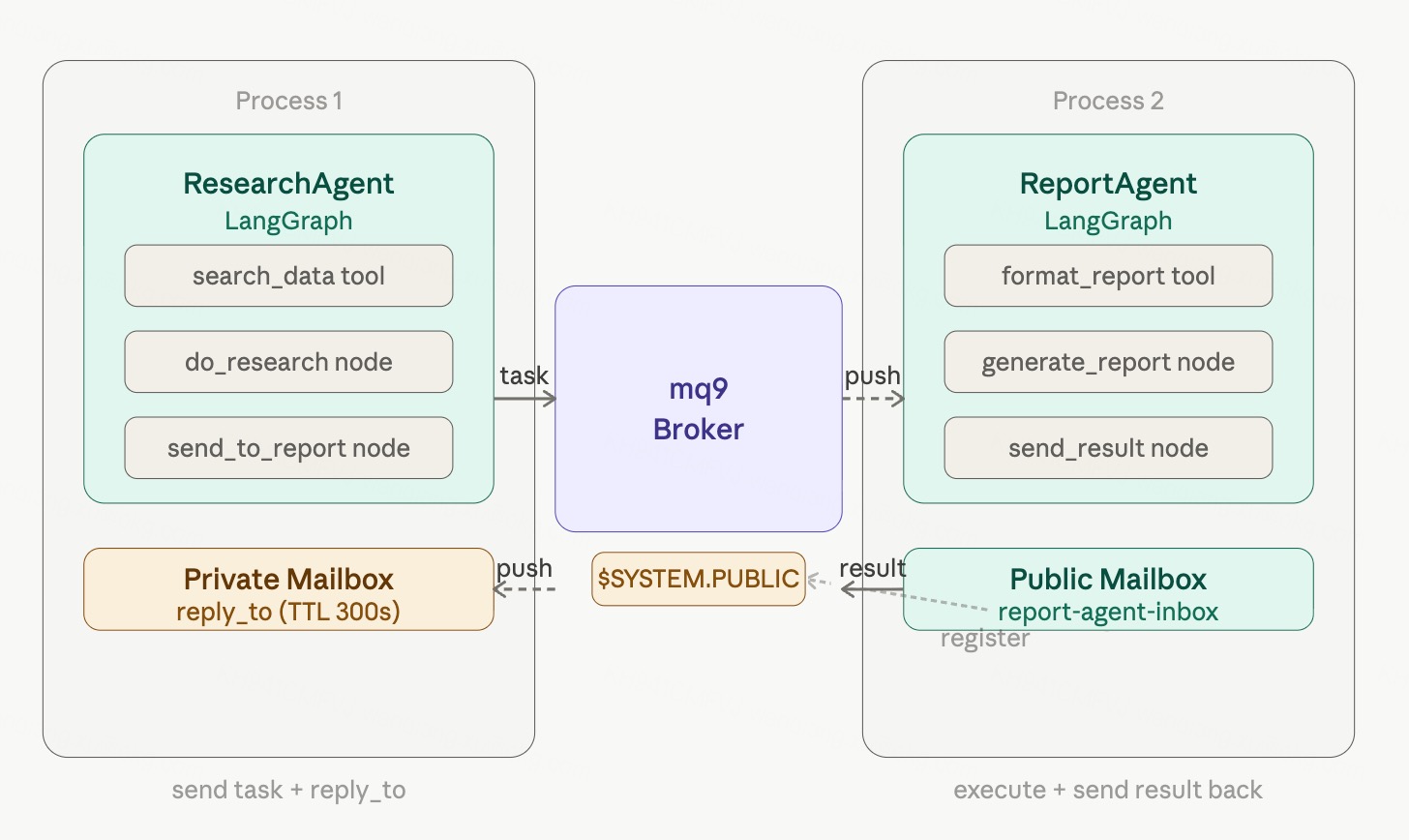
LangGraph 负责单个 Agent 内部的逻辑:工具调用、推理、状态流转。
mq9 负责 Agent 之间的消息传递:跨进程、异步、离线不丢。
安装
pip install langgraph langchain-openai langchain-mq9ReportAgent
ReportAgent 是服务提供方,启动时注册到 $SYSTEM.PUBLIC,持续监听任务 Mailbox,收到任务后用 LangGraph 处理,结果发回给发送方。
# report_agent.py
import asyncio
import json
from typing import TypedDict, Annotated
import operator

from langgraph.graph import StateGraph, END
from langgraph.prebuilt import create_react_agent
from langchain_openai import ChatOpenAI
from langchain_core.messages import HumanMessage
from langchain_core.tools import tool
from robustmq.mq9 import Client, Priority

SERVER = "nats://demo.robustmq.com:4222"
llm = ChatOpenAI(model="gpt-4o-mini")

# ── 工具 ──────────────────────────────────────────────────
@tool
def format_report(title: str, content: str) -> str:
    """格式化生成报告"""
    return f"# {title}\n\n## 摘要\n{content}\n\n## 结论\n分析完成。"

# ── LangGraph 图 ──────────────────────────────────────────
class ReportState(TypedDict):
    messages: Annotated[list, operator.add]
    query: str
    data: str
    report: str
    reply_to: str

inner_agent = create_react_agent(llm, [format_report])

def generate_report(state: ReportState):
    result = inner_agent.invoke({
        "messages": [HumanMessage(
            content=f"根据以下数据生成关于 '{state['query']}' 的报告:\n{state['data']}"
        )]
    })
    return {"report": result["messages"][-1].content}

async def send_result(state: ReportState):
    async with Client(SERVER) as client:
        await client.send(
            state["reply_to"],
            json.dumps({"report": state["report"]}).encode(),
            priority=Priority.NORMAL
        )
    print("ReportAgent: 报告已发回")
    return {}

graph = StateGraph(ReportState)
graph.add_node("generate", generate_report)
graph.add_node("send", send_result)
graph.set_entry_point("generate")
graph.add_edge("generate", "send")
graph.add_edge("send", END)
report_app = graph.compile()

# ── 主流程 ────────────────────────────────────────────────
async def main():
    async with Client(SERVER) as client:
        # 创建公开 Mailbox,name 就是地址,ResearchAgent 直接用这个名字发消息
        await client.create(
            ttl=86400,
            public=True,
            name="report-agent-inbox"
        )
        print("ReportAgent: Mailbox 已创建,监听任务中...")

        async def on_task(msg):
            task = json.loads(msg.data)
            print(f"ReportAgent: 收到任务 — {task['query']}")
            await report_app.ainvoke({
                "messages": [],
                "query": task["query"],
                "data": task["data"],
                "report": "",
                "reply_to": task["reply_to"]
            })

        await client.subscribe("report-agent-inbox", on_task)
        await asyncio.sleep(float("inf"))  # 持续运行

asyncio.run(main())
ResearchAgent
ResearchAgent 是任务发起方,创建私有结果 Mailbox,执行 LangGraph 搜索逻辑,把结果发给 ReportAgent,然后异步等待报告。
# research_agent.py
import asyncio
import json
from typing import TypedDict, Annotated
import operator

from langgraph.graph import StateGraph, END
from langgraph.prebuilt import create_react_agent
from langchain_openai import ChatOpenAI
from langchain_core.messages import HumanMessage
from langchain_core.tools import tool
from robustmq.mq9 import Client, Priority

SERVER = "nats://demo.robustmq.com:4222"
llm = ChatOpenAI(model="gpt-4o-mini")

# ── 工具 ──────────────────────────────────────────────────
@tool
def search_data(query: str) -> str:
    """搜索相关数据"""
    return f"关于 '{query}' 的数据:[数据1, 数据2, 数据3]"

# ── LangGraph 图 ──────────────────────────────────────────
class ResearchState(TypedDict):
    messages: Annotated[list, operator.add]
    query: str
    research_result: str
    reply_mailbox: str

inner_agent = create_react_agent(llm, [search_data])

def do_research(state: ResearchState):
    result = inner_agent.invoke({
        "messages": [HumanMessage(content=f"搜索并汇总:{state['query']}")]
    })
    return {"research_result": result["messages"][-1].content}

async def send_to_report(state: ResearchState):
    async with Client(SERVER) as client:
        task = {
            "query": state["query"],
            "data": state["research_result"],
            "reply_to": state["reply_mailbox"]
        }
        await client.send(
            "report-agent-inbox",
            json.dumps(task).encode(),
            priority=Priority.NORMAL
        )
    print("ResearchAgent: 已发给 ReportAgent,继续处理其他任务...")
    return {}

graph = StateGraph(ResearchState)
graph.add_node("research", do_research)
graph.add_node("send", send_to_report)
graph.set_entry_point("research")
graph.add_edge("research", "send")
graph.add_edge("send", END)
research_app = graph.compile()

# ── 主流程 ────────────────────────────────────────────────
async def main():
    async with Client(SERVER) as client:
        # 创建私有结果 Mailbox,用来接收 ReportAgent 的报告
        reply_box = await client.create(ttl=300)
        print(f"ResearchAgent 结果 Mailbox: {reply_box.mail_address}")

        # 启动 LangGraph 执行
        await research_app.ainvoke({
            "messages": [],
            "query": "mq9 协议的核心特性",
            "research_result": "",
            "reply_mailbox": reply_box.mail_address
        })

        # 异步等待报告,设置超时
        print("ResearchAgent: 等待报告...")
        result_event = asyncio.Event()

        async def on_result(msg):
            result = json.loads(msg.data)
            print(f"\n===== 收到报告 =====\n{result['report']}")
            result_event.set()

        sub = await client.subscribe(reply_box.mail_address, on_result)
        await asyncio.wait_for(result_event.wait(), timeout=30.0)
        await sub.unsubscribe()

asyncio.run(main())
运行
# 终端 1:先启动 ReportAgent
python report_agent.py

# 终端 2:启动 ResearchAgent
python research_agent.py
ReportAgent 终端:
ReportAgent: 已注册,监听任务中...
ReportAgent: 收到任务 — mq9 协议的核心特性
ReportAgent: 报告已发回
ResearchAgent 终端:
ResearchAgent 结果 Mailbox: m-xxxx-xxxx
ResearchAgent: 已发给 ReportAgent,继续处理其他任务...
ResearchAgent: 等待报告...

===== 收到报告 =====
# mq9 协议的核心特性
...
关键设计
ReportAgent 创建公开 Mailbox:create(public=True, name="report-agent-inbox") 创建一个固定地址的 Mailbox,ResearchAgent 提前知道这个名字,直接往这里发消息。
ResearchAgent 只创建私有 Mailbox:它不需要被发现,只需要一个接收结果的地址。TTL 设为 300 秒,用完自动清理。
reply_to 模式:任务里携带 reply_to 字段,告知 ReportAgent 结果发往哪里。这是异步请求-响应的标准模式。
两个 Agent 完全解耦:ReportAgent 不在线时,ResearchAgent 投递的任务持久化在 Mailbox 里,等 ReportAgent 启动后自动取走。
延伸阅读
如果你的 Agent 之间需要遵循 A2A 标准协议通信,参见《用 mq9 解决 A2A 异步可靠通信的问题》——原理相同,任务格式换成 A2A 标准 Task 对象。
相关资源
- langchain-mq9 文档:robustmq.com/zh/mq9/LangChain
- mq9 SDK:robustmq.com/zh/mq9/SDK
- RobustMQ:github.com/robustmq/robustmq
- Demo server:
nats://demo.robustmq.com:4222