
NATS JetStream Protocol Reference
JetStream is NATS's built-in persistence engine. It adds message storage, replay, flow control, and precise delivery semantics on top of Core NATS Pub/Sub. It introduces no new wire protocol commands — all operations are completed via standard PUB (with reply-to) and MSG. The server internally exposes a set of Subjects starting with $JS.API., clients send JSON requests to these Subjects, and the server sends results back to the reply-to address.
Why JetStream
Core NATS is purely real-time: if there are no online subscribers when a message is sent, the message is lost. JetStream solves the following problems through Stream (persistent storage) + Consumer (consumption cursor):
- Resume consumption from the last checkpoint after a service restart
- Multiple consumers independently replay the same batch of messages
- Guarantee messages are processed at least once (or exactly once)
- Apply backpressure when message volume exceeds consumption speed
Core Concepts
Stream
A Stream is a persistent container for messages, bound to a set of Subjects (wildcards supported). Messages published to these Subjects are automatically captured and stored according to the retention policy.
Storage types (storage):
| Value | Description |
|---|---|
file | Persisted to disk; messages survive server restarts (default) |
memory | Stored in memory; higher performance but messages are lost on restart |
Retention policies (retention):
| Value | Description |
|---|---|
limits | Retain based on count, size, or age limits; supports message replay (default) |
workqueue | Messages are deleted immediately after acknowledgement; each message is processed by only one consumer |
interest | Messages are only retained while a Consumer is associated; deleted after all Consumers acknowledge |
Consumer
A Consumer is a consumption cursor on a Stream that records how far consumption has progressed and supports resumption after disconnection. The same Stream can have multiple independent Consumers, each maintaining its own progress.
Durable vs Ephemeral:
| Type | Description |
|---|---|
| Durable | Has a name; cursor is retained after disconnection, resumes from where it left off |
| Ephemeral | No name; server automatically cleans it up when the connection closes |
Push vs Pull:
| Type | Description | Use Case |
|---|---|---|
| Push Consumer | Server proactively pushes messages to a specified Subject | Single consumer, ordered replay |
| Pull Consumer | Client actively requests messages, controlling consumption pace | Multi-consumer horizontal scaling, backpressure control |
Deliver policies (deliver_policy):
| Value | Description |
|---|---|
all | Start from the first message in the Stream (default) |
new | Only receive messages published after subscribing |
last | Start from the last message |
last_per_subject | Take the last message per Subject |
by_start_sequence | Start from the sequence number specified by opt_start_seq |
by_start_time | Start from the timestamp specified by opt_start_time |
ACK policies (ack_policy):
| Value | Description |
|---|---|
explicit | Each message must be explicitly ACKed; unACKed messages are redelivered after timeout (default) |
all | ACKing one message confirms all previous messages as well |
none | No ACK required; messages are immediately considered processed after delivery |
Replay policies (replay_policy):
| Value | Description |
|---|---|
instant | Replay messages as fast as possible, ignoring original publish timing (default) |
original | Replay at the same intervals as originally published, simulating real traffic |
Protocol Basics
All JetStream management operations use the standard NATS Request-Reply pattern:
Client → PUB $JS.API.<operation> <reply-to> <len>
         <json request body>

Server → MSG <reply-to> <sid> <len>
         <json response body>
The client first SUB _INBOX.<random> to subscribe to a random address, uses it as the reply-to in the request, then waits for the server to send the response to that address.
All responses include an error field on failure:
| Field | Type | Description |
|---|---|---|
error.code | number | HTTP status code (e.g. 400, 404, 500) |
error.err_code | number | NATS internal error code |
error.description | string | Error description |
Common error codes:
err_code | Description |
|---|---|
| 10039 | Stream does not exist |
| 10014 | Consumer does not exist |
| 10058 | Stream name already in use |
| 10059 | Subject is already bound to another Stream |
| 10071 | Consumer name already exists |
INFO — Server and Account Info
$JS.API.INFO
Query the overall JetStream status of the server. Request payload is empty.
Response fields:
| Field | Type | Description |
|---|---|---|
type | string | Fixed value io.nats.jetstream.api.v1.account_info_response |
memory | number | Current memory storage used (bytes) |
storage | number | Current disk storage used (bytes) |
reserved_memory | number | Reserved memory (bytes) |
reserved_storage | number | Reserved disk space (bytes) |
streams | number | Current number of Streams |
consumers | number | Current number of Consumers |
limits.max_memory | number | Memory limit; -1 = unlimited |
limits.max_storage | number | Disk limit; -1 = unlimited |
limits.max_streams | number | Stream count limit; -1 = unlimited |
limits.max_consumers | number | Consumer count limit; -1 = unlimited |
limits.max_ack_pending | number | Max pending ACK messages; -1 = unlimited |
limits.duplicate_window_max | number | Max deduplication window duration (nanoseconds) |
limits.max_bytes_required | bool | Whether setting max_bytes is required |
tiers | object? | Multi-tenant tier configuration (optional) |
error | object? | Present on error |
$JS.API.ACCOUNT.INFO
Returns the same format as $JS.API.INFO, querying the JetStream usage of the current account.
Stream Management
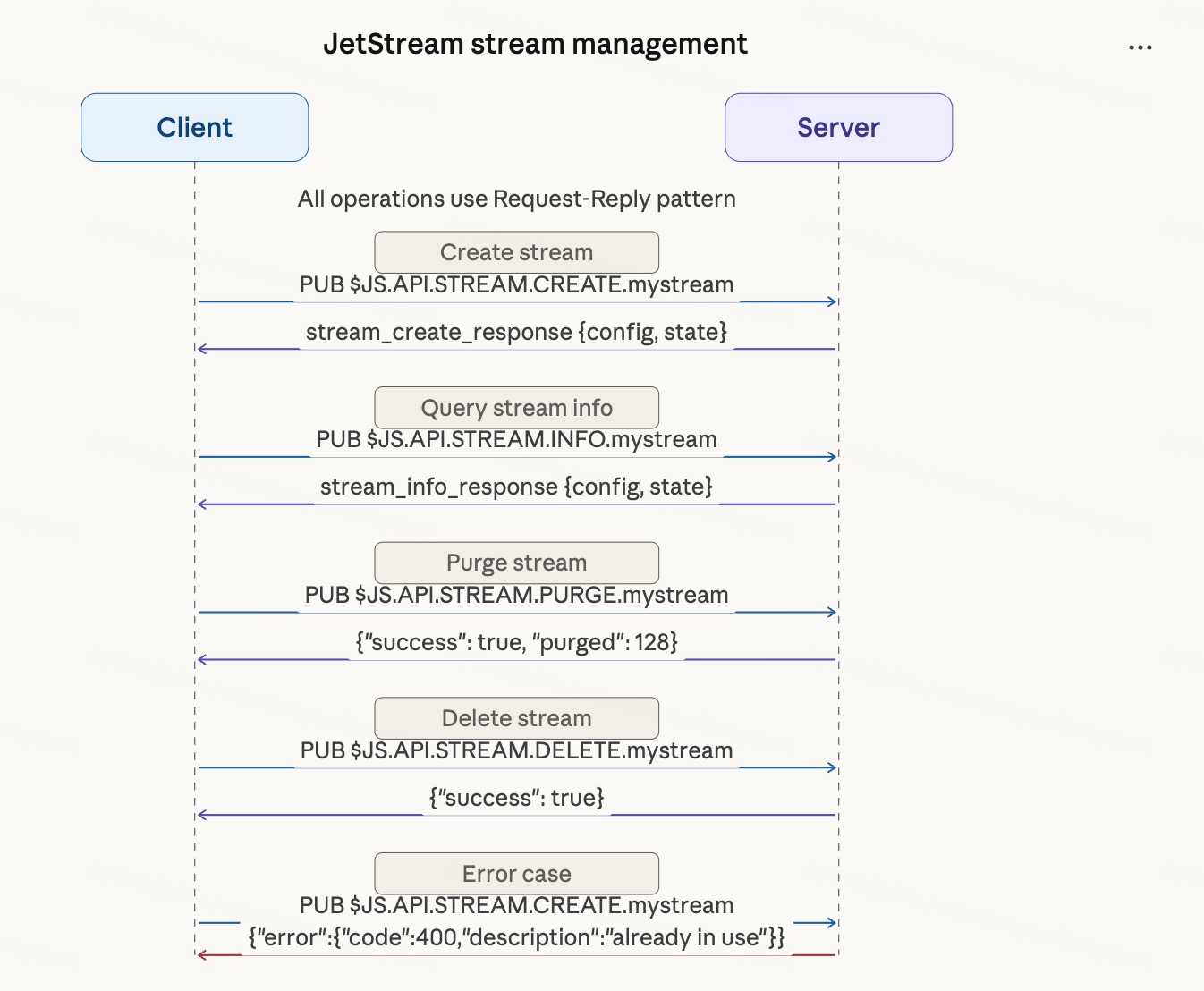
$JS.API.STREAM.CREATE.<stream>
Create a new Stream.
Request fields (StreamConfig):
| Field | Type | Required | Default | Description |
|---|---|---|---|---|
name | string | ✓ | — | Stream name; only letters, digits, -, _ allowed |
subjects | string[] | — | [] | Bound Subject list; wildcards supported |
storage | string | — | file | Storage type: file / memory |
retention | string | — | limits | Retention policy: limits / workqueue / interest |
max_msgs | number | — | -1 | Max message count; -1 = unlimited |
max_bytes | number | — | -1 | Max storage bytes; -1 = unlimited |
max_age | number | — | 0 | Max message retention duration (nanoseconds); 0 = unlimited |
max_msg_size | number | — | -1 | Max single message size (bytes); -1 = unlimited |
max_msgs_per_subject | number | — | -1 | Max messages per Subject; -1 = unlimited |
num_replicas | number | — | 1 | Replica count (cluster mode) |
description | string | — | "" | Description |
discard | string | — | "" | Discard policy when limit exceeded: old / new |
duplicate_window | number? | — | — | Deduplication window duration (nanoseconds) |
deny_delete | bool | — | false | Prohibit deleting individual messages |
deny_purge | bool | — | false | Prohibit purging the Stream |
allow_rollup_hdrs | bool | — | false | Allow KV rollup headers (KV Store specific) |
Response fields (StreamInfoResponse):
| Field | Type | Description |
|---|---|---|
type | string | Fixed value io.nats.jetstream.api.v1.stream_create_response |
config | object | The resulting StreamConfig; same structure as request fields |
state.messages | number | Total message count |
state.bytes | number | Total storage bytes |
state.first_seq | number | Sequence number of the first message |
state.last_seq | number | Sequence number of the last message |
state.consumer_count | number | Current Consumer count |
created | string | Creation time (RFC3339) |
cluster.name | string? | Cluster name |
cluster.leader | string? | Current leader node name |
cluster.replicas | array? | Replica node list |
error | object? | Present on error |
$JS.API.STREAM.UPDATE.<stream>
Update Stream configuration. Request and response format are identical to STREAM.CREATE.
$JS.API.STREAM.INFO.<stream>
Query Stream information. Request payload is empty; response format is the same as STREAM.CREATE.
$JS.API.STREAM.DELETE.<stream>
Delete a Stream along with all its messages and Consumers. Request payload is empty.
Response fields:
| Field | Type | Description |
|---|---|---|
type | string | Fixed value io.nats.jetstream.api.v1.stream_delete_response |
success | bool | Whether deletion succeeded |
error | object? | Present on error |
$JS.API.STREAM.LIST
List full information for all Streams.
Request fields:
| Field | Type | Required | Default | Description |
|---|---|---|---|---|
offset | number? | — | 0 | Pagination offset |
Response fields:
| Field | Type | Description |
|---|---|---|
type | string | Fixed value io.nats.jetstream.api.v1.stream_list_response |
total | number | Total Stream count |
offset | number | Current page offset |
limit | number | Max items per page |
streams | array | List of StreamInfo; same structure as STREAM.CREATE response |
error | object? | Present on error |
$JS.API.STREAM.NAMES
List all Stream names only (no full info). Request fields same as STREAM.LIST.
Response fields:
| Field | Type | Description |
|---|---|---|
type | string | Fixed value io.nats.jetstream.api.v1.stream_names_response |
total | number | Total Stream count |
offset | number | Current page offset |
limit | number | Max items per page |
streams | string[] | List of Stream names |
error | object? | Present on error |
$JS.API.STREAM.PURGE.<stream>
Purge messages from a Stream, with optional Subject or sequence filtering.
Request fields:
| Field | Type | Required | Description |
|---|---|---|---|
filter | string? | — | Only purge messages matching this Subject |
seq | number? | — | Only purge messages with sequence number less than this value |
keep | number? | — | Keep the most recent N messages; purge the rest |
Response fields:
| Field | Type | Description |
|---|---|---|
type | string | Fixed value io.nats.jetstream.api.v1.stream_purge_response |
success | bool | Whether the operation succeeded |
purged | number | Actual number of messages deleted |
error | object? | Present on error |
$JS.API.STREAM.MSG.GET.<stream>
Fetch a specific message from a Stream by sequence number or Subject without updating any consumption progress.
Request fields (choose one):
| Field | Type | Description |
|---|---|---|
seq | number? | Fetch by global sequence number |
last_by_subj | string? | Fetch the last message for a Subject |
next_by_subj | string? | Fetch the next message for a Subject after the current position |
Response fields:
| Field | Type | Description |
|---|---|---|
type | string | Fixed value io.nats.jetstream.api.v1.stream_msg_get_response |
message.subject | string | Message Subject |
message.seq | number | Global sequence number in the Stream |
message.data | string | Message payload (base64 encoded) |
message.time | string | Publish time (RFC3339) |
message.headers | object? | Message headers (key-value pairs) |
error | object? | Present on error |
$JS.API.STREAM.MSG.DELETE.<stream>
Delete a specific message from a Stream.
Request fields:
| Field | Type | Required | Default | Description |
|---|---|---|---|---|
seq | number | ✓ | — | Sequence number of the message to delete |
no_erase | bool | — | false | true = mark as deleted only; false = overwrite with random data |
Response fields:
| Field | Type | Description |
|---|---|---|
type | string | Fixed value io.nats.jetstream.api.v1.stream_msg_delete_response |
success | bool | Whether deletion succeeded |
error | object? | Present on error |
$JS.API.STREAM.SNAPSHOT.<stream>
Create a Stream snapshot; the server streams data to deliver_subject.
Request fields:
| Field | Type | Required | Default | Description |
|---|---|---|---|---|
deliver_subject | string | ✓ | — | Subject to receive snapshot data; client must SUB first |
no_consumers | bool | — | false | true = exclude Consumer info from snapshot |
check_msgs | bool | — | false | true = verify message integrity before snapshotting |
Response fields:
| Field | Type | Description |
|---|---|---|
type | string | Fixed value io.nats.jetstream.api.v1.stream_snapshot_response |
success | bool | Whether the snapshot was successfully started |
error | object? | Present on error |
$JS.API.STREAM.RESTORE.<stream>
Restore a Stream from a snapshot. Request payload is empty; after the response the client pushes snapshot data to the server. Response format same as STREAM.SNAPSHOT.
$JS.API.STREAM.LEADER.STEPDOWN.<stream>
Trigger the current Stream's Raft leader to step down. Request payload is empty.
Response fields:
| Field | Type | Description |
|---|---|---|
type | string | Fixed value io.nats.jetstream.api.v1.stream_leader_stepdown_response |
success | bool | Whether the stepdown was triggered |
error | object? | Present on error |
$JS.API.STREAM.PEER.REMOVE.<stream>
Remove a peer node from the Stream's replica set.
Request fields:
| Field | Type | Required | Description |
|---|---|---|---|
peer | string | ✓ | Name of the peer node to remove |
Response format same as STREAM.LEADER.STEPDOWN.
Consumer Management
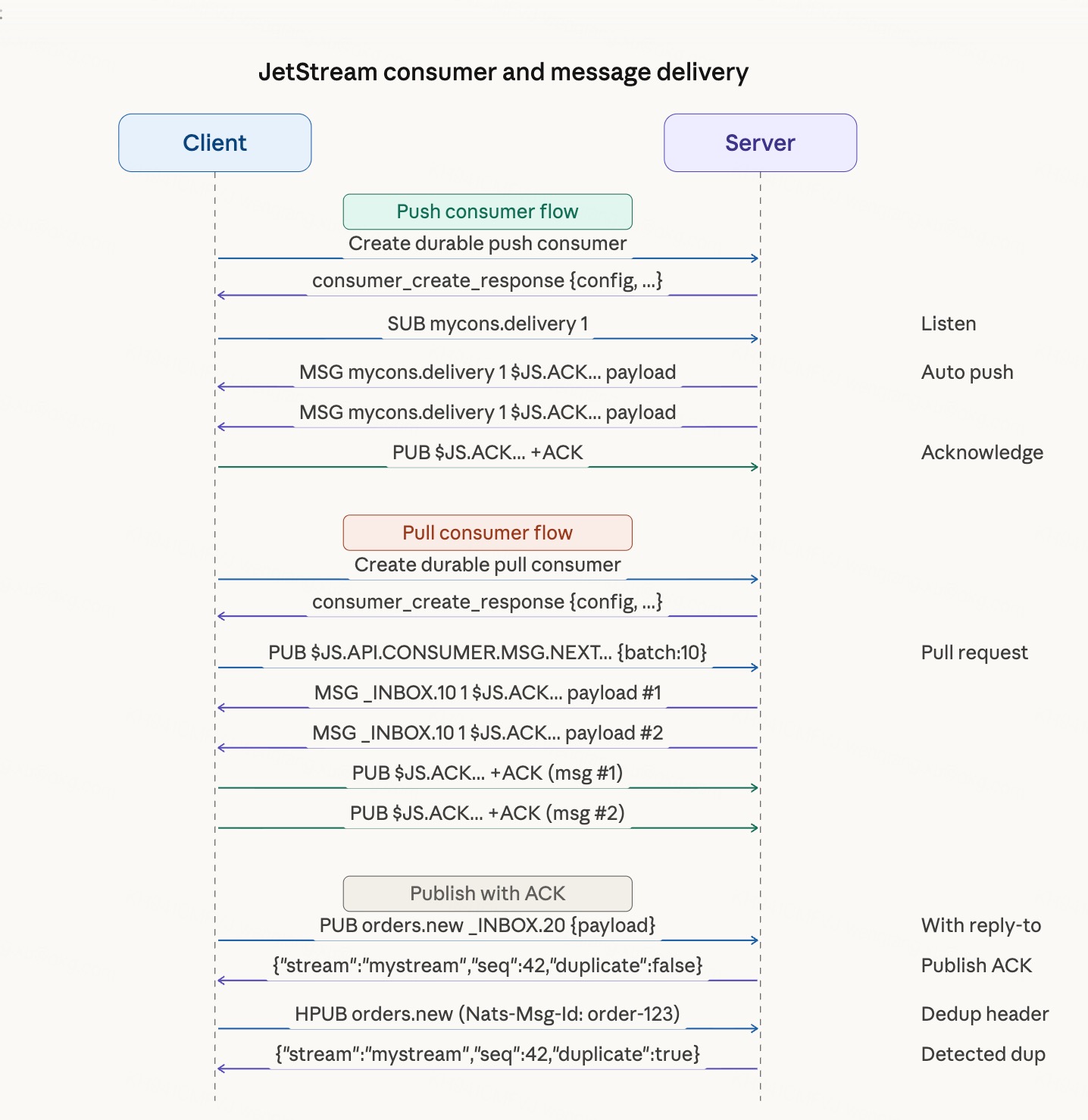
$JS.API.CONSUMER.CREATE.<stream> / $JS.API.CONSUMER.DURABLE.CREATE.<stream>.<consumer>
Create a Consumer. DURABLE.CREATE creates a durable Consumer; CREATE creates an ephemeral Consumer.
Request fields:
| Field | Type | Required | Description |
|---|---|---|---|
stream_name | string | ✓ | Target Stream name |
action | string? | — | create (only create) / update (only update) / empty (create or update) |
config.durable_name | string? | — | Durable Consumer name; omit for ephemeral |
config.name | string? | — | Consumer name (new style, NATS 2.10+) |
config.description | string? | — | Description |
config.deliver_subject | string? | — | Push Subject for push Consumer; omit for pull Consumer |
config.deliver_policy | string | — | Deliver policy; default all |
config.ack_policy | string | — | ACK policy; default explicit |
config.ack_wait | number? | — | ACK timeout (nanoseconds); unACKed messages are redelivered after this |
config.max_deliver | number? | — | Max redelivery attempts; -1 = unlimited |
config.replay_policy | string | — | Replay policy; default instant |
config.filter_subject | string? | — | Only consume messages matching this Subject (single) |
config.filter_subjects | string[]? | — | Only consume messages matching these Subjects (multiple) |
config.opt_start_seq | number? | — | Start sequence when deliver_policy is by_start_sequence |
config.opt_start_time | string? | — | Start time when deliver_policy is by_start_time (RFC3339) |
config.max_waiting | number? | — | Max concurrent pull requests (pull Consumer) |
config.max_ack_pending | number? | — | Max pending ACK messages; -1 = unlimited |
config.flow_control | bool | — | Enable flow control (push Consumer) |
config.idle_heartbeat | number? | — | Idle heartbeat interval (nanoseconds, push Consumer) |
config.backoff | number[]? | — | Redelivery backoff sequence (nanoseconds) |
config.pause_until | string? | — | Pause delivery until this time (RFC3339) |
Response fields (ConsumerInfoResponse):
| Field | Type | Description |
|---|---|---|
type | string | Fixed value io.nats.jetstream.api.v1.consumer_create_response |
stream_name | string | Parent Stream name |
name | string | Consumer name |
config | object | Consumer configuration; same structure as request config |
created | string | Creation time (RFC3339) |
delivered.consumer_seq | number | Consumer sequence of the last delivered message |
delivered.stream_seq | number | Stream sequence of the last delivered message |
ack_floor.consumer_seq | number | Lowest Consumer sequence of ACKed messages |
ack_floor.stream_seq | number | Lowest Stream sequence of ACKed messages |
num_ack_pending | number | Number of messages pending ACK |
num_redelivered | number | Number of redelivered messages |
num_waiting | number | Number of waiting pull requests |
num_pending | number | Number of messages not yet delivered |
cluster | object? | Cluster info |
paused | bool? | Whether delivery is paused |
pause_remaining | number? | Remaining pause duration (nanoseconds) |
error | object? | Present on error |
$JS.API.CONSUMER.INFO.<stream>.<consumer>
Query Consumer information. Request payload is empty; response format same as CONSUMER.CREATE.
$JS.API.CONSUMER.DELETE.<stream>.<consumer>
Delete a Consumer. Request payload is empty.
Response fields:
| Field | Type | Description |
|---|---|---|
type | string | Fixed value io.nats.jetstream.api.v1.consumer_delete_response |
success | bool | Whether deletion succeeded |
error | object? | Present on error |
$JS.API.CONSUMER.LIST.<stream>
List full information for all Consumers on a Stream. Request fields same as STREAM.LIST (pagination).
Response fields:
| Field | Type | Description |
|---|---|---|
type | string | Fixed value io.nats.jetstream.api.v1.consumer_list_response |
total | number | Total Consumer count |
offset | number | Current page offset |
limit | number | Max items per page |
consumers | array | List of ConsumerInfo; same structure as CONSUMER.CREATE response |
error | object? | Present on error |
$JS.API.CONSUMER.NAMES.<stream>
List all Consumer names on a Stream. Request fields same as STREAM.LIST (pagination).
Response fields:
| Field | Type | Description |
|---|---|---|
type | string | Fixed value io.nats.jetstream.api.v1.consumer_names_response |
total | number | Total Consumer count |
offset | number | Current page offset |
limit | number | Max items per page |
consumers | string[] | List of Consumer names |
error | object? | Present on error |
$JS.API.CONSUMER.MSG.NEXT.<stream>.<consumer>
Pull Consumer fetch. The server delivers messages directly to the request's reply-to address; each message's reply-to field is the ACK address.
Request fields:
| Field | Type | Required | Default | Description |
|---|---|---|---|---|
batch | number | — | 1 | Max messages to pull at once |
expires | number? | — | — | Wait timeout (nanoseconds); server returns 408 when no messages available |
max_bytes | number? | — | — | Max total bytes to return in one fetch |
no_wait | bool | — | false | true = return immediately when no messages are available |
idle_heartbeat | number? | — | — | Heartbeat interval while waiting (nanoseconds) |
Messages are delivered as standard MSG with no JSON body. Status codes returned on timeout or error:
| Status | Description |
|---|---|
408 | Request timed out; no messages available |
409 | Consumer has expired or been deleted |
$JS.API.CONSUMER.LEADER.STEPDOWN.<stream>.<consumer>
Trigger the Consumer's Raft leader to step down. Request payload is empty.
Response fields:
| Field | Type | Description |
|---|---|---|
type | string | Fixed value io.nats.jetstream.api.v1.consumer_leader_stepdown_response |
success | bool | Whether the stepdown was triggered |
error | object? | Present on error |
$JS.API.CONSUMER.PAUSE.<stream>.<consumer>
Pause or resume Consumer message delivery.
Request fields:
| Field | Type | Required | Description |
|---|---|---|---|
pause_until | string? | — | Pause until this time (RFC3339); omit to resume immediately |
Response fields:
| Field | Type | Description |
|---|---|---|
type | string | Fixed value io.nats.jetstream.api.v1.consumer_pause_response |
paused | bool | Whether delivery is currently paused |
pause_until | string? | Pause expiry time; absent when not paused |
error | object? | Present on error |
Message Consumption and Publishing
Message Delivery (Push Consumer)
Each message delivered by the server has the ACK address in the reply-to field:
MSG mycons.delivery 1 $JS.ACK.mystream.mycons.1.5.5.1700000000.0 13\r\n
Hello JetStream\r\n
Publish with ACK (Publish ACK)
A normal PUB has no persistence confirmation. Publishing with a reply-to causes the server to reply after the message is written to the Stream.
Response fields:
| Field | Type | Description |
|---|---|---|
stream | string | Name of the Stream the message was written to |
seq | number | Global sequence number of the message in the Stream |
duplicate | bool | Whether the message is a duplicate (same Nats-Msg-Id within the deduplication window) |
For deduplicated publishing, include Nats-Msg-Id in the Header:
HPUB orders.new _INBOX.1 44 68\r\n
NATS/1.0\r\n
Nats-Msg-Id: order-123\r\n
\r\n
{"item":"widget","qty":5}\r\n
ACK Mechanism
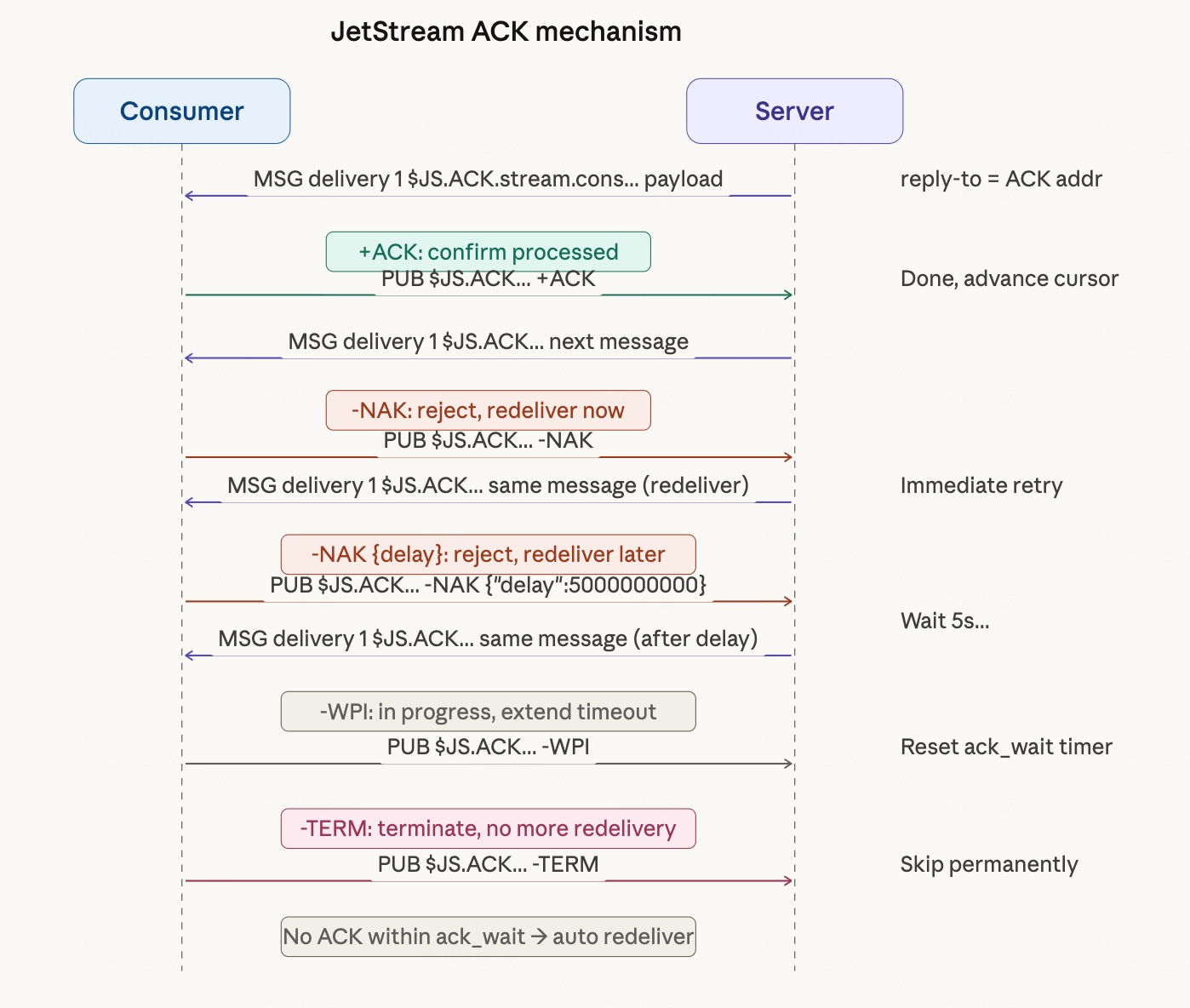
ACK address format:
$JS.ACK.<stream>.<consumer>.<delivered_count>.<stream_seq>.<consumer_seq>.<timestamp>.<pending_msgs>ACK address field meanings:
| Field | Description |
|---|---|
delivered_count | Number of times this message has been delivered (increments on redelivery) |
stream_seq | Global sequence number of the message in the Stream |
consumer_seq | Sequence number of the message within the Consumer |
timestamp | Delivery timestamp (nanoseconds) |
pending_msgs | Number of messages currently pending for this Consumer |
ACK operations (PUB different payloads to the ACK address):
| Payload | Type | Request Fields | Description |
|---|---|---|---|
Empty or +ACK | Ack | none | Message processed successfully |
-NAK | Nak | delay (number?, nanoseconds, optional) | Reject; redeliver immediately or after delay |
-WPI | Progress | none | Processing in progress; reset ack_wait timer to prevent redelivery |
-NXT | Next | batch (number, default 1) | Ack and immediately request the next message (pull Consumer only) |
-TERM | Term | none | Terminate; no redelivery |
Direct Get
Read a message directly from a Stream, bypassing the Consumer layer without updating any consumption progress. Suited for random access. The response is in HMSG format with metadata in headers and the raw message content as the body.
$JS.API.DIRECT.GET.<stream>
Request fields (choose one):
| Field | Type | Description |
|---|---|---|
seq | number? | Fetch by global sequence number |
last_by_subj | string? | Fetch the last message for a Subject |
next_by_subj | string? | Fetch the next message for a Subject after a specified position |
start_time | string? | Fetch the first message after a specified time (RFC3339) |
Response HMSG headers:
| Header | Description |
|---|---|
Nats-Stream | Stream name |
Nats-Sequence | Global sequence number of the message |
Nats-Subject | Subject of the message |
Nats-Time-Stamp | Publish time (RFC3339) |
Nats-Num-Pending | Number of additional messages remaining (optional) |
$JS.API.DIRECT.GET.<stream>.<subject>
Fetch the latest message for the specified Subject. Request payload is empty; response format same as above.
$JS.API.DIRECT.GET.LAST.<stream>.<subject>
Alias for DIRECT.GET.<stream>.<subject> with the same semantics; response format same as above.
Advisory Events
The server publishes advisory events to $JS.EVENT.ADVISORY.* when Stream and Consumer state changes occur (fire-and-forget, no reply-to). Clients subscribe to these Subjects to monitor cluster state.
Common payload fields for all events:
| Field | Type | Description |
|---|---|---|
type | string | Event type identifier, e.g. io.nats.jetstream.advisory.v1.stream_action |
id | string | Unique event ID (UUID) |
timestamp | string | Event time (RFC3339) |
stream | string | Related Stream name (Stream-type events) |
consumer | string? | Related Consumer name (Consumer-type events) |
action | string? | Operation type, e.g. create / delete / update |
client.acc | string? | Account name of the operation initiator |
client.user | string? | User name of the operation initiator |
Complete event list:
| Event | Subject | Triggered When |
|---|---|---|
| Stream created | $JS.EVENT.ADVISORY.STREAM.CREATED.<stream> | A Stream is created |
| Stream deleted | $JS.EVENT.ADVISORY.STREAM.DELETED.<stream> | A Stream is deleted |
| Stream updated | $JS.EVENT.ADVISORY.STREAM.UPDATED.<stream> | Stream config changes |
| Stream leader elected | $JS.EVENT.ADVISORY.STREAM.LEADER_ELECTED.<stream> | Leader changes in cluster mode |
| Consumer created | $JS.EVENT.ADVISORY.CONSUMER.CREATED.<stream>.<consumer> | A Consumer is created |
| Consumer deleted | $JS.EVENT.ADVISORY.CONSUMER.DELETED.<stream>.<consumer> | A Consumer is deleted |
| Consumer leader elected | $JS.EVENT.ADVISORY.CONSUMER.LEADER_ELECTED.<stream>.<consumer> | Consumer leader changes in cluster mode |
| API audit | $JS.EVENT.ADVISORY.API | After every API call; records operation log |
| Snapshot started | $JS.EVENT.ADVISORY.STREAM.SNAPSHOT.CREATE.<stream> | A snapshot task starts |
| Snapshot completed | $JS.EVENT.ADVISORY.STREAM.SNAPSHOT.COMPLETE.<stream> | A snapshot task completes |
| Restore started | $JS.EVENT.ADVISORY.STREAM.RESTORE.CREATE.<stream> | A restore task starts |
| Restore completed | $JS.EVENT.ADVISORY.STREAM.RESTORE.COMPLETE.<stream> | A restore task completes |
KV Store
KV Store is a key-value store implemented on JetStream Streams. The underlying Stream is named KV_<bucket>. Each write to a key is a message with Subject $KV.<bucket>.<key>; versions are managed by sequence number.
Bucket Management
Creating and deleting buckets are Stream operations on the underlying KV_<bucket> Stream. Use $JS.API.STREAM.CREATE.KV_<bucket> with subjects: ["$KV.<bucket>.>"], max_msgs_per_subject: 1 (keep only the latest value), and allow_rollup_hdrs: true.
KV Put
Publish a message to $KV.<bucket>.<key>. Include a reply-to to receive a write confirmation.
Response fields (KvPutResponse):
| Field | Type | Description |
|---|---|---|
stream | string | Underlying Stream name (KV_<bucket>) |
seq | number | Sequence number after write (the latest version number of the key) |
duplicate | bool | Whether this is a duplicate write |
KV Get
Read the latest value for a key using Direct Get: $JS.API.DIRECT.GET.LAST.KV_<bucket>.$KV.<bucket>.<key>.
Response is HMSG with the following headers:
| Header | Description |
|---|---|
Nats-Stream | Underlying Stream name |
Nats-Subject | Full Subject ($KV.<bucket>.<key>) |
Nats-Sequence | Current version sequence number |
Nats-Time-Stamp | Write time |
KV-Operation | Empty = PUT, DEL = deleted, PURGE = purged |
Nats-Num-Pending | Number of historical revisions of the key |
KV Delete
Publish an empty message with KV-Operation: DEL header to $KV.<bucket>.<key> to mark the key as deleted. Write confirmation same as Put.
KV Purge
Publish an empty message with KV-Operation: PURGE header to $KV.<bucket>.<key> to remove all historical revisions of the key. Write confirmation same as Put.
KV Keys (List All Keys)
Subscribe to $KV.<bucket>.> and consume via a Consumer, filtering out KV-Operation: DEL and PURGE entries to obtain the list of currently live keys. Delivered as a stream of push messages; no unified JSON response body.
KV Watch
Create a push Consumer on $KV.<bucket>.<key|>. Receive a push message in KV Get format each time a key changes.
Object Store
Object Store is an object storage implementation built on JetStream Streams. The underlying Stream is named OBJ_<bucket>. It supports storing arbitrarily large binary objects via chunked upload. Each object consists of two parts:
- Metadata: stored at the
$OBJ.<bucket>.info.<object>Subject - Data chunks: stored at the
$OBJ.<bucket>.chunks.<nonce>Subject
Object Bucket Management
Use $JS.API.STREAM.CREATE.OBJ_<bucket> with subjects: ["$OBJ.<bucket>.>"].
Upload an Object (Put)
Upload is a two-step process: send metadata first, then send data in chunks.
Metadata fields (ObjectMeta, published to $OBJ.<bucket>.info.<object>):
| Field | Type | Required | Description |
|---|---|---|---|
name | string | ✓ | Object name |
description | string | — | Description |
nonce | string | ✓ | Unique random identifier; data chunks are published to $OBJ.<bucket>.chunks.<nonce> |
bucket | string | ✓ | Bucket name |
chunks | number | ✓ | Total number of chunks |
size | number | ✓ | Total object size (bytes) |
headers | object? | — | Custom headers |
options | object? | — | Extended options |
Chunks are published sequentially to $OBJ.<bucket>.chunks.<nonce>; the server assembles the object automatically after the last chunk.
Response fields after upload completes (ObjectInfo):
| Field | Type | Description |
|---|---|---|
name | string | Object name |
description | string | Description |
nonce | string | Unique identifier |
bucket | string | Bucket name |
chunks | number | Total chunk count |
size | number | Total size (bytes) |
digest | string | Content digest (sha-256=...) |
deleted | bool | Whether the object has been deleted |
headers | object? | Custom headers |
Download an Object (Get)
Send a request to $OBJ.<bucket>; the server streams chunks to deliver_subject.
Request fields:
| Field | Type | Required | Description |
|---|---|---|---|
name | string | ✓ | Object name |
deliver_subject | string | ✓ | Subject to receive data chunks; client must SUB first |
No JSON response body; data is pushed as standard MSG chunks to deliver_subject.
Get Object Metadata (Info)
Send a request to $OBJ.<bucket>; returns ObjectInfo with the same fields as the post-upload response.
Request fields:
| Field | Type | Required | Description |
|---|---|---|---|
name | string | ✓ | Object name |
Delete an Object
Send a request to $OBJ.<bucket>.
Request fields:
| Field | Type | Required | Description |
|---|---|---|---|
name | string | ✓ | Name of the object to delete |
Response fields:
| Field | Type | Description |
|---|---|---|
success | bool | Whether deletion succeeded |
List All Objects
Send a request to $OBJ.<bucket> with an empty payload.
Response fields (ObjectListResponse):
| Field | Type | Description |
|---|---|---|
bucket | string | Bucket name |
objects | array | List of ObjectInfo; same structure as post-upload response |
Watch for Changes
Subscribe to $OBJ.<bucket>.info.>. Receive an ObjectInfo push each time an object is uploaded or deleted (deleted: true indicates deletion).
JetStream Domain
When the server is configured with a JetStream Domain, the API Subject prefix changes from $JS.API to $JS.<domain>.API:
# Default
PUB $JS.API.STREAM.INFO.mystream _INBOX.1 0

# With specified domain
PUB $JS.hub.API.STREAM.INFO.mystream _INBOX.1 0
Relationship with Core NATS
JetStream introduces no new wire protocol commands; protocol parsers require no modifications:
- Messages published via ordinary
PUB, if they match a Stream's Subject, are automatically captured and persisted — publishers do not need to be aware of JetStream - To receive a Publish ACK, simply include a reply-to in the
PUB - Messages received by Consumers are standard
MSGorHMSG; the reply-to field is the ACK address - All management operations are JSON requests sent to
$JS.API.*Subjects
All the work of implementing JetStream compatibility is at the application layer: recognizing specific Subject prefixes, parsing JSON request bodies, executing the corresponding operations, and serializing results into JSON to reply via MSG.
Complete API Subject Reference
Stream Operations
| Operation | Subject |
|---|---|
| Create | $JS.API.STREAM.CREATE.<stream> |
| Update | $JS.API.STREAM.UPDATE.<stream> |
| Query info | $JS.API.STREAM.INFO.<stream> |
| List all | $JS.API.STREAM.LIST |
| List names | $JS.API.STREAM.NAMES |
| Delete | $JS.API.STREAM.DELETE.<stream> |
| Purge messages | $JS.API.STREAM.PURGE.<stream> |
| Get message | $JS.API.STREAM.MSG.GET.<stream> |
| Delete message | $JS.API.STREAM.MSG.DELETE.<stream> |
| Snapshot | $JS.API.STREAM.SNAPSHOT.<stream> |
| Restore | $JS.API.STREAM.RESTORE.<stream> |
| Step down leader | $JS.API.STREAM.LEADER.STEPDOWN.<stream> |
| Remove peer | $JS.API.STREAM.PEER.REMOVE.<stream> |
Consumer Operations
| Operation | Subject |
|---|---|
| Create ephemeral | $JS.API.CONSUMER.CREATE.<stream> |
| Create named | $JS.API.CONSUMER.CREATE.<stream>.<consumer> |
| Create durable | $JS.API.CONSUMER.DURABLE.CREATE.<stream>.<consumer> |
| Query info | $JS.API.CONSUMER.INFO.<stream>.<consumer> |
| List all | $JS.API.CONSUMER.LIST.<stream> |
| List names | $JS.API.CONSUMER.NAMES.<stream> |
| Delete | $JS.API.CONSUMER.DELETE.<stream>.<consumer> |
| Pull fetch | $JS.API.CONSUMER.MSG.NEXT.<stream>.<consumer> |
| Step down leader | $JS.API.CONSUMER.LEADER.STEPDOWN.<stream>.<consumer> |
| Pause | $JS.API.CONSUMER.PAUSE.<stream>.<consumer> |
Direct Get Operations
| Operation | Subject |
|---|---|
| Get by request body | $JS.API.DIRECT.GET.<stream> |
| Get by subject | $JS.API.DIRECT.GET.<stream>.<subject> |
| Get last by subject | $JS.API.DIRECT.GET.LAST.<stream>.<subject> |
Other
| Operation | Subject |
|---|---|
| Server info | $JS.API.INFO |
| Account info | $JS.API.ACCOUNT.INFO |
| ACK address | $JS.ACK.<stream>.<consumer>.<...> |
| Flow control | $JS.FC.<stream>.> |