Technical Design: Building RobustMQ Test Agent on Hermes Agent
One-Line Summary
The original RobustMQ Test Agent Technical Design Document planned to build the RobustMQ Test Agent using Claude API tool use + custom Python tool functions. This document redesigns it as a set of Skills running on Hermes Agent. Hermes provides the LLM loop, Skill scheduling, Cron triggering, cross-session memory, multi-channel access, and a security sandbox. The team only needs to focus on implementing RobustMQ-specific tool functions and test scenario descriptions.
The entire system is deployed on a single cloud server. Hermes, the RobustMQ cluster, Chaos Mesh / Chaosd fault injection, and the multi-language SDK matrix all run together on the same machine.
Why Hermes Instead of Building from Scratch
The original design document explained the system's "What" and "Why" clearly, but it chose a "build it ourselves" execution path: use the Claude API tool use to implement the Agent loop, use Python tool functions for the toolset, and avoid introducing an Agent framework.
That path looks lightweight, but it isn't. A production-ready AI Agent system requires more than just tool functions. At minimum it also needs:
- LLM call loop (multi-turn tool use, token management, error retry)
- Tool scheduling (parameter validation, concurrency control, timeout handling)
- Context management (scenario state, cross-call memory, long-task persistence)
- Trigger mechanism (Cron scheduling, manual triggers, external events)
- Channel access (Slack / Feishu / email / GitHub)
- Security sandbox (Skill-level isolation, command whitelisting, sensitive operation auditing)
- Report generation and persistence
Tool functions are just the tip of the iceberg. The remaining engineering effort is several times larger than the tool functions themselves. Hermes Agent solves all of this. Its positioning is "self-hosted AI Agent control plane" with native support for Skills extension, Cron triggering, multi-channel, Sandbox, and cross-session memory. What we need to build aligns almost perfectly with what Hermes provides.
| Build from scratch | Use Hermes |
|---|---|
| Write Claude API call loop yourself | Built-in |
| Implement tool use scheduling yourself | Automatic Skill discovery and invocation |
| Write scenario description loading yourself | SKILL.md is the scenario description |
| Implement multi-turn context management yourself | Cross-session memory built-in |
| Handle tool errors and retries yourself | Skills error handling framework built-in |
| Implement Cron triggering yourself | Cron tool built-in |
| Add multi-channel support yourself | Channels built-in (Feishu / Slack, etc.) |
| Build permissions and Sandbox yourself | Default security model + 6 backends |
| Write report persistence yourself | Memory system built-in |
Building the core system on Hermes has a hidden benefit: the future quality assurance workflow won't just be "run tests". For example, team members can send instructions directly to Hermes via Feishu, like "run the network jitter scenario that failed last time" or "what new issues came up today." Hermes translates the instruction into a Skill call and returns the result through the same channel. The testing system evolves from "automated running" to "AI assistant" — something a pure Python script system can't do.
Overall Architecture
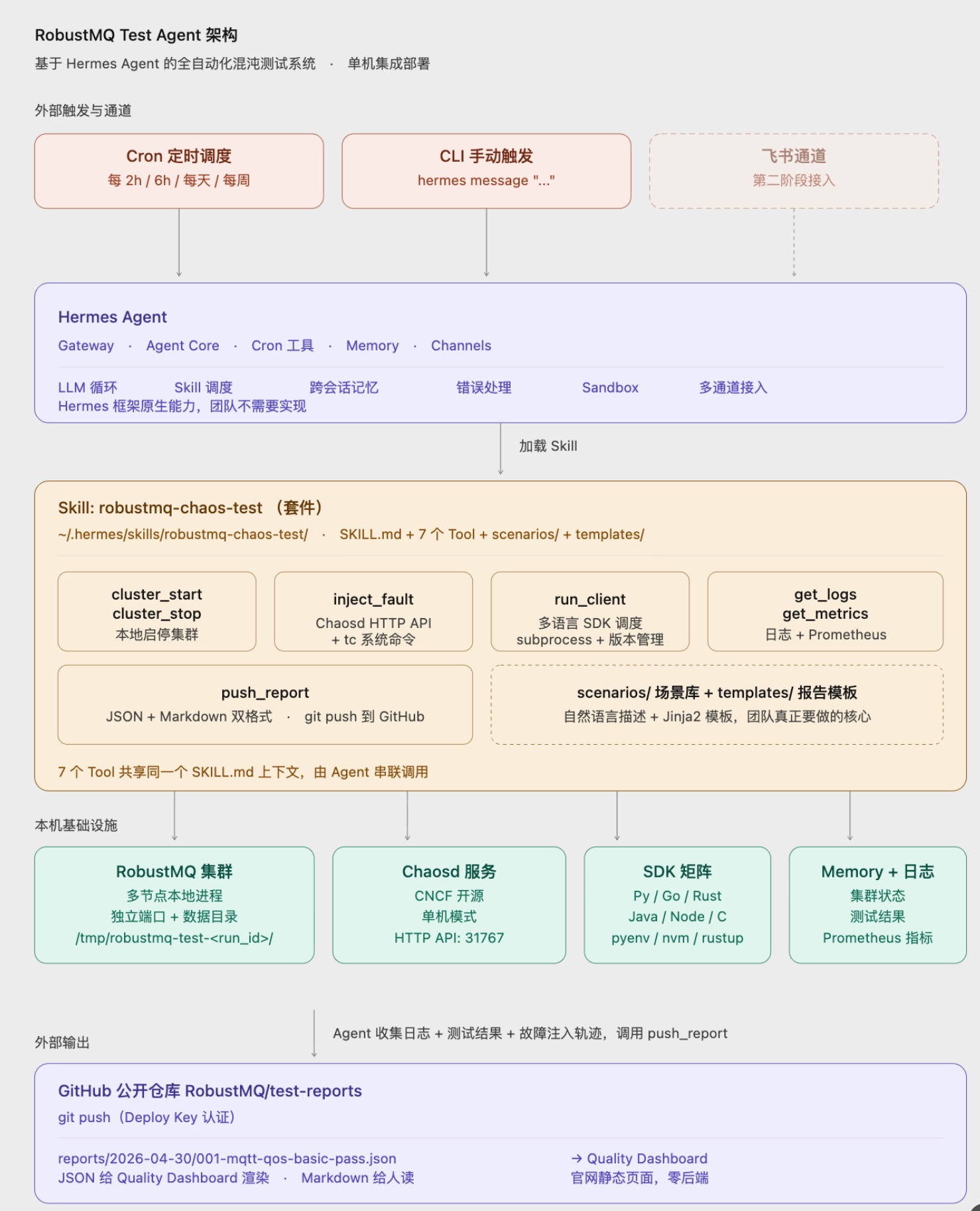
The entire system is deployed on a single Linux cloud server (recommended 8C16G or higher, to support running a multi-node RobustMQ cluster and fault injection).
Hermes serves as the entry layer, hosting the Agent loop, Skill scheduling, and Cron triggering. All RobustMQ-related capabilities are packaged into a single Skill suite. Each Tool inside the Skill operates directly on the RobustMQ cluster, Chaosd service, and report system via local commands, HTTP calls, and file read/write.
Skill Design: robustmq-chaos-test Suite
The 7 tools from the original design document all map to Tools within a single Skill suite. The core rationale for this design: they share the same context (scenario description, cluster state, test progress), and it's most natural for an Agent to call them in sequence. If they were split into 7 independent Skills, managing context across Skills would become a new burden.
Skill directory structure:
~/.hermes/skills/robustmq-chaos-test/
├── SKILL.md                    # Scenario descriptions and tool instructions for the Agent
├── tools/
│   ├── cluster.py              # cluster_start / cluster_stop
│   ├── chaos.py                # inject_fault
│   ├── client.py               # run_client (multi-language SDK dispatch)
│   ├── observability.py        # get_logs / get_metrics
│   └── report.py               # push_report
├── scenarios/                  # Scenario library (natural language descriptions)
│   ├── mqtt/
│   │   ├── qos_basic.md
│   │   ├── broker_kill.md
│   │   └── ...
│   └── mq9/
│       ├── mailbox_lifecycle.md
│       ├── priority_ordering.md
│       └── ...
├── templates/
│   ├── report.md.j2            # Report Markdown template
│   └── report.json.schema      # Report JSON structure definition
└── config.yml                  # SDK version matrix, Chaosd endpoint, report repo URL
SKILL.md is the "scenario description" the Agent actually reads. It tells the Agent what this Skill does, what Tools are available, when to use which one, and what reports should look like. It is the "natural language scenario description" mentioned in the original design document, just in Hermes standard format.
Each Tool is a Python function following the Hermes Skill Tool definition spec: clear signatures, typed parameters, structured return data. The Agent calls Tools via LLM; Hermes handles scheduling and error handling.
Below is a brief design of several key Tools.
cluster_start / cluster_stop
def cluster_start(nodes: int = 3, config: str = "default") -> ClusterInfo:
    """
    Start a RobustMQ cluster with the specified number of nodes.

    Uses locally pre-compiled RobustMQ binaries (path configured in config.yml).
    Each node runs on independent ports and data directories; waits for health
    checks to pass after startup.

    Returns ClusterInfo containing PID, port, data directory, and status for each node.
    """
Implementation notes:
- No Docker; directly spawn multiple RobustMQ processes, each with independent ports
- Data directories use temporary directories (
/tmp/robustmq-test-<run_id>/), cleaned up on cluster_stop - Health checks poll RobustMQ's built-in
/healthendpoint - ClusterInfo is written to Hermes Memory so subsequent Tool calls can access the cluster reference directly
inject_fault
Fault injection choice: Chaosd (single-machine version of Chaos Mesh) as primary, supplemented by tc / kill system commands.
Chaosd is the physical machine mode of the CNCF project Chaos Mesh, deployed as a background service that injects faults via HTTP API. Coverage includes:
- Process: kill -9, kill -SIGTERM, CPU pressure, memory pressure
- Network: latency injection, packet loss, bandwidth limiting, network partition
- Disk: I/O latency, disk fill
- Clock: time travel (for TTL and retransmission logic testing)
def inject_fault(
    fault_type: Literal["kill", "network_delay", "network_loss",
                        "disk_pressure", "clock_skew"],
    target: str,                    # Node ID or PID
    params: dict,                   # Fault parameters
    duration: str = "30s"
) -> FaultHandle:
    """
    Inject a fault of the specified type. Returns a FaultHandle that can be used to stop the fault early.
    """
Implementation notes:
- Chaosd service runs persistently on the cloud server, port 31767 (default)
- Function wraps Chaosd HTTP API calls, parameters aligned to Chaosd schema
- Minimal scenarios (e.g., pure
tcnetwork jitter) can run system commands directly via subprocess, bypassing Chaosd - FaultHandle records fault ID, target, injection time, for report traceability
run_client
Multi-language SDK test client dispatch. Key design: pre-install multiple language runtimes and version management tools on the server; the Skill switches between them using version managers.
| Language | Version Manager | Installed Versions |
|---|---|---|
| Python | pyenv | 3.10 / 3.11 / 3.12 |
| Go | gvm or asdf | 1.21 / 1.22 / 1.23 |
| Rust | rustup | stable / nightly |
| Java | sdkman | 11 / 17 / 21 |
| Node.js | nvm | 18 / 20 / 22 |
| C | apt system packages | default gcc version |
Test client code for each language lives in the clients/ subdirectory, each packaged as a standalone CLI:
clients/
├── python-paho/
│   ├── pyproject.toml
│   └── client.py          # python client.py --scenario qos_basic --broker ...
├── go-paho/
│   ├── go.mod
│   └── main.go
├── rust-rumqttc/
│   ├── Cargo.toml
│   └── src/main.rs
└── ...
The run_client Tool takes four parameters — protocol / sdk_lang / sdk_version / scenario — and does the following:
- Switch to the specified SDK version using the version manager
- Enter the corresponding client directory, ensure dependencies are installed (auto-installs on first run)
- Start the client process, passing scenario parameters (broker address, message count, QoS, etc.)
- Client returns structured results after completion (messages sent, received, lost, latency distribution, error details)
- Results written to Hermes Memory for subsequent Agent analysis
get_logs / get_metrics
def get_logs(level: str = "WARN", time_range: str = "5m",
             node: Optional[str] = None) -> list[LogEntry]:
    """Filter entries from RobustMQ node logs by level and time range."""

def get_metrics(node: str) -> NodeMetrics:
    """Get real-time metrics for the specified node: connections, message rate, memory, CPU."""
Implementation notes:
- Log file locations are recorded in ClusterInfo at cluster_start time
- get_logs reads files directly + simple filtering, no ELK dependency
- get_metrics calls RobustMQ's built-in Prometheus endpoint, parses key metrics and returns them
- Returns structured data; the Agent bases its root-cause analysis directly on this data
push_report
def push_report(report: TestReport) -> str:
    """
    Push the test report to a public GitHub repository.
    Returns the public access URL for the report.
    """
Implementation notes:
- Report repo authenticated via GitHub Deploy Key (write access to specific reports repo only)
- Skill executes git clone / commit / push directly, no GitHub API calls
- Reports output in both JSON and Markdown formats (rendered using Jinja2 templates)
- JSON is used as the Quality Dashboard data source; Markdown is for human reading
- Commit message format is fixed:
test: <scenario_name> <pass|fail> <run_id>
Scenario Library Design
The scenario library is the most critical part of the entire system. Tool functions are a one-time engineering effort — once done, they rarely need changes. The scenario library is where continuous input happens. Whether the system can find problems and achieve sufficient coverage depends entirely on how precisely the scenario descriptions are written.
The Agent doesn't read scripts or flowcharts — it reads natural language description files in scenarios/. The clearer the scenario descriptions, the more reliable and reproducible the Agent's results. This is harder than writing code: it requires translating test engineers' experience into language that AI can understand and execute.
Scenario Description Structure
Each scenario description file must include four sections — none can be omitted:
## Scenario Goal
One sentence describing what this scenario validates.

## Prerequisites
- Cluster node count and configuration (how many nodes, what config)
- Protocol and SDK (which language, which version)
- Other dependencies (e.g., specific Chaosd configuration required)

## Execution Steps
1. Step one (specific action, no ambiguity)
2. Step two
3. ...

## Validation Criteria
- PASS condition: explicit numbers or states (e.g., "message loss rate = 0", "all nodes healthy")
- FAIL condition: what constitutes failure
- Allowed margin of error (if any)
Common writing mistakes:
- "Test QoS" → Agent improvises, results are not reproducible
- "Check if messages are normal" → Agent doesn't know what "normal" means and guesses
- Missing prerequisites → Agent starts in wrong state, results are meaningless
Complete Example: broker_kill Scenario
## Scenario Goal
Verify that QoS 1 messages are fully redelivered after a broker node is forcibly killed,
with no message loss.

## Prerequisites
- 3-node cluster using default config
- Protocol: MQTT, QoS 1
- SDK: Python paho-mqtt 2.x
- Messages: 1000, send rate 100/second

## Execution Steps
1. Start 3-node cluster, wait for health checks to pass
2. Start Python test client, begin sending QoS 1 messages continuously at 100/second
3. After 300 messages sent, execute kill -9 on node 1 (the leader)
4. Wait 30 seconds for the cluster to complete leader re-election
5. Continue sending remaining messages until total reaches 1000
6. Wait for all messages to be consumed (wait up to 60 seconds)
7. Reconcile: total sent vs. total received

## Validation Criteria
- PASS: received message count = 1000, no duplicate messages, out-of-order is acceptable
- FAIL: received message count < 1000 (message loss), or timeout before all consumed
- Allowed margin: QoS 1 allows duplicates; received count ≥ 1000 is acceptable
This is the actual content the Agent reads. The precise description in Step 3 — "execute kill -9 on node 1 (the leader)" — is what allows the Agent to correctly choose the parameters for calling inject_fault.
Scenario Priority Levels
Not all scenarios have the same priority. They are divided into three levels by trigger frequency:
P0: Must run on every trigger (every 2 hours)
Basic functional correctness validation — the system's minimum health baseline. Any P0 failure triggers an immediate alert.
- QoS 0 / 1 / 2 normal send and receive
- Normal cluster start/stop
- Single-node connection and message send/receive
P1: Run once daily (overnight)
Fault scenarios and multi-language coverage; discovers stability and compatibility issues.
- broker kill -9 + restart
- Network latency / packet loss injection
- Persistent session reconnection
- One version each of Python / Go / Rust basic scenarios
P2: Run once weekly (Sunday)
Combined scenarios and full SDK matrix; discovers deep-seated issues.
- Full multi-language, multi-version SDK compatibility matrix
- Slow consumer + broker restart combined scenario
- Large number of simultaneous disconnections
- Long-running test (memory leak detection)
Scenario library growth path:
Write all P0 + core P1 scenarios in the first phase, and the system can produce valuable reports. P2 scenarios and additional SDK version coverage can be added incrementally — they don't all need to be ready from day one.
Trigger Mechanism
Three trigger types coexist in phase one:
Cron triggering (primary)
Hermes has a built-in Cron tool. Configuration example:
# ~/.hermes/cron.yml
- name: robustmq-mqtt-basic
  schedule: "0 */2 * * *"          # Every 2 hours
  prompt: "Run the MQTT basic scenario library (QoS 0/1/2, large messages, high-concurrency connections)"

- name: robustmq-mqtt-chaos
  schedule: "0 */6 * * *"          # Every 6 hours
  prompt: "Run MQTT fault scenario library (broker kill, network latency, packet loss)"

- name: robustmq-mq9-full
  schedule: "0 4 * * *"            # Daily at 4 AM
  prompt: "Run mq9 full scenario library"

- name: robustmq-compatibility-matrix
  schedule: "0 0 * * 0"            # Every Sunday
  prompt: "Run full multi-language, multi-version SDK compatibility matrix"
When each Cron fires, the Hermes Agent reads the prompt, loads the robustmq-chaos-test Skill, and autonomously decides the execution order (which scenarios to run first, which SDK combinations to cover, when to stop). After the Agent finishes, it calls push_report to submit the report.
Manual triggering
Issue instructions directly via the Hermes CLI:
hermes message "Run the MQTT broker kill scenario, verify with Python 2.x SDK"Good for targeted validation during development or regression testing after bug fixes.
Event triggering (roadmap)
Phase two: connect GitHub webhook so every push to the RobustMQ main repo triggers automated regression tests.
Multi-Channel Integration (Roadmap)
Phase one: no channel integration; all interactions via the Hermes CLI.
Phase two: Feishu integration:
- Team members send instructions to the Hermes Bot via Feishu DM
- Key events proactively pushed to Feishu groups (test failures, report generation, long-task progress)
- Report URLs attached directly to Feishu messages; click to jump to the Quality Dashboard
Hermes's Channels system natively supports this; only Feishu App credentials need to be configured — no Skill code changes required.
Report System
Reports output in JSON + Markdown dual format and committed to a public GitHub repository (e.g., RobustMQ/test-reports).
Repository structure:
test-reports/
├── reports/
│   ├── 2026-04-30/
│   │   ├── 001-mqtt-qos-basic-pass.json
│   │   ├── 001-mqtt-qos-basic-pass.md
│   │   ├── 002-mqtt-broker-kill-fail.json
│   │   ├── 002-mqtt-broker-kill-fail.md
│   │   └── ...
│   └── ...
└── index.json                     # Full report index (for Dashboard)
JSON reports contain:
- Test metadata (time, scenario, protocol, SDK language/version, cluster config)
- Agent execution trace (Tool call sequence, parameters and return values per step)
- Validation results (messages sent / received / lost / duplicated, latency distribution)
- Problem description and preliminary root-cause analysis
- Severity level (P0 / P1 / P2)
- Raw log excerpt (up to 1MB; truncated and marked if exceeded)
Markdown reports are the human-readable version of JSON, with AI-written natural language summaries.
The Quality Dashboard is a static page on the RobustMQ website that reads index.json from the GitHub repo to render the list and details — zero backend.
Implementation Steps
1. Environment Setup (1 day)
- One cloud server (Linux, 8C16G or higher)
- Install Hermes Agent (Python + uv package manager)
- Install Chaosd (Chaos Mesh single-machine version, runs as persistent background service on port 31767)
- Pre-install multi-language runtimes: Python (pyenv) / Go (gvm or asdf) / Rust (rustup) / Java (sdkman) / Node (nvm)
2. Build Skill Skeleton (1 day)
- Create
chaos-testdirectory under~/.hermes/skills/ - Write
SKILL.md: tell Hermes what this Skill does, what Tools are available, which to call when - Define function signatures for 7 Tools (signatures only, no implementation yet)
- Write
config.yml: cluster binary path, Chaosd endpoint, GitHub report repo URL
3. Implement 7 Tools (5.5 days)
Implement in dependency order; verify each one works before moving to the next:
| Order | Tool | Effort |
|---|---|---|
| 1 | cluster_start / cluster_stop: start and stop the cluster locally | 1 day |
| 2 | get_logs / get_metrics: read log files + pull Prometheus metrics | 0.5 days |
| 3 | run_client: multi-language SDK test client dispatch (start with Python only) | 1 day |
| 4 | inject_fault: wrap Chaosd HTTP API (start with kill and network_delay) | 1 day |
| 5 | push_report: JSON + Markdown dual-format generation + git push to GitHub | 1 day |
4. Write Scenario Library (1 day)
- Write test scenario descriptions in natural language under
scenarios/ - First batch: 5 basic scenarios + 3 fault scenarios
- Subsequent expansion: add all remaining basic / fault / client-error / combined scenarios
5. Configure Triggers + Verify End-to-End Loop (1 day)
- Write
~/.hermes/cron.yml: configure scheduled triggers (every 2h / 6h / daily / weekly) - Verify manual triggering:
hermes message "run the basic scenarios" - Verify the complete loop: Cron trigger → Agent reads scenario → chains Tool calls → push_report → GitHub
6. Report System (1 day)
- Create public GitHub repository (test-reports)
- Configure Deploy Key (write-only)
- Implement automatic
index.jsonupdates (full report index) - Quality Dashboard: static page on the website reads index.json to render — zero backend
7. Expansion (Phase 2, 6–7 days)
- Complete SDK matrix: add multiple versions for Go / Rust / Java / Node
- Complete scenario library: cover all MQTT and mq9 scenarios
- Feishu channel integration: only Hermes configuration changes, no Skill code changes
Effort Summary
| Phase | Content | Effort |
|---|---|---|
| Phase 1 | Environment + Skill skeleton + 7 Tools + first scenario batch + Cron working + report system | 7–8 days |
| Phase 2 | Complete SDK matrix + all scenarios + Feishu channel | 6–7 days |
| Phase 3 | Claude Code deep-analysis Skill + continuous iteration | Ongoing |
Key Decisions
| Decision | Conclusion | Rationale |
|---|---|---|
| Single-machine vs. distributed deployment | Single-machine | Simplified operations; chaos testing doesn't require distributed infra |
| Skill granularity | 1 suite + multiple Tools | Shared context; more natural for Agent to orchestrate |
| Fault injection | Chaosd primary + tc supplemental | Chaosd has broad coverage and HTTP API; tc for minimal scenarios |
| Multi-language SDK isolation | No Docker; local version management | Fast startup; single-machine environment is sufficient |
| GitHub commit method | git push (Deploy Key) | Simpler and more controllable than API calls |
| Phase 1 channel | CLI only | Get core loop working first; Feishu later |
| Report format | JSON + Markdown dual format | JSON for Dashboard; Markdown for humans |
| Dashboard backend | Static page + GitHub repo | Zero backend, zero maintenance cost |
Roadmap
Phase 1 (1–2 weeks): Get the minimal loop working
Cloud server setup, Skill skeleton, MQTT basic scenarios, Python SDK, Cron triggering, report publishing. Goal: automatically produce several test reports per day, publicly published to the Dashboard.
Phase 2 (3–4 weeks): Complete the scenario library and SDK matrix
Cover all MQTT and mq9 scenarios; expand SDK multi-version coverage across 5 languages; introduce automatic compatibility root-cause analysis. Phase 2 output can serve as a public quality statement for RobustMQ protocol compatibility.
Phase 3 (4–8 weeks): Feishu integration + deep AI analysis
Integrate the Feishu channel; team members query test results and trigger regressions via natural language. Introduce Claude Code as an additional Skill for source-level deep analysis of failed scenarios, with direct fix suggestions.
Phase 4 (ongoing): Evolve from testing system to RobustMQ project assistant
Hermes isn't just for running chaos tests. Additional Skills can be added: release checks, documentation review, Issue label automation, user question answering. The testing system is the entry point; the final form is a full-featured AI assistant for the RobustMQ project.
Summary
Building the RobustMQ Test Agent on top of Hermes Agent outsources the generic engineering problems — Agent framework, Skill scheduling, Cron, Sandbox, cross-session memory, multi-channel access — to Hermes, letting the team focus their energy on RobustMQ-specific tool functions and the scenario library.
In terms of engineering effort, the original self-build approach required implementing "tool functions + framework + channels + persistence" entirely from scratch. With Hermes, the work narrows to tool functions and Skill configuration, compressing the first-phase effort from an estimated 4–6 weeks to 1–2 weeks.
More importantly, this system built on Hermes has a clear evolution path: starting from running chaos tests, ultimately becoming a full-featured AI assistant for the RobustMQ project. This is a possibility that a pure Python script system can't offer.